Showing posts with label Emacs. Show all posts

Friday, 17 November 2017

Emacs interface to Recoll

Lately I'm using Recoll (a desktop full-text search tool), https://www.lesbonscomptes.com/recoll/, which comes with a GUI, but it also can be used from a terminal. I wanted to be able to use it from within Emacs and I found two existing ways:


  1. helm-recoll https://github.com/emacs-helm/helm-recoll
  2. counsel-recoll, bundled with swiper https://github.com/abo-abo/swiper
I already use Ivy/Swiper/Counsel, which is very nice, so route 1) didn't appeal much to me: I would have to install Helm just to get Emacs-Recoll interaction and perhaps suffer some problems by having Helm and Ivy together.

Route 2) was not very nice either because counsel-recoll will interactively search the database for matches and it will show in the mini-buffer the names of the files whose contents match the given search so you can quickly open them, but you can not see any context in the files around the search you are trying to do.

So I ended up writing a small functon (ag-recoll), that suits me better. I can give a number of words, which recoll will use to do a search, and then only on those files matching, I will call ag, which will create a buffer with all the places in the files where the given words match. The given buffer is a "compilation" buffer, so the lines are hyperlinks, which can be easily followed to open the file at the place of interest.

The function is as simple as:


(defun ag-recoll (string directory)
  "Search using ag based on the findings of recoll. Search will be done in a given DIRECTORY, and the STRING will be interpreted as concatenated by ANDs for recoll and with ORs for ag.

   The idea is that when I search, for example, for 'openacc mpi', recoll will give me all the files that have those two words somewhere in the file, and ag will find lines that match any of the terms.

   For the moment this is very crude, and most options to recoll and ag are hard-coded in the ag-recoll.sh script, most notably that ag will look for a maximum of 10 matches in each file to avoid huge lists with common searches."

  (interactive (list (ag/read-from-minibuffer "Search string")
                   (read-directory-name "Directory: ")))
  (setq command-string (format "%s %s %s" "/home/angelv/localhacks/ag-recoll.sh" directory string))
  (setq regexp nil)
  (compilation-start
   command-string
   #'ag-mode
   `(lambda (mode-name) ,(ag/buffer-name string directory regexp))))

which uses the ag-recoll.sh script:

#!/bin/bash
dir=$1; shift
ors=$(printf '%s|' address@hidden)
recoll -t -b $@ dir:$dir | sed -e "s/file:\/\///" | xargs -d '\n' ag --max-count 10 --group --line-number column --color --color-match 30\;43 --color-path 1\;32 --smart-case ${ors%|}


So, as an example, when I call ag-recoll with STRING 'openacc pgi' and DIRECTORY /home/angelv/Learning in my workstation, the result is like this:


where each line is a hyperlink to the corresponding match in the file and you can use the common grep-mode commands to open a file, go to the next match C-x `, etc.

This is useful already as it is, but I will try to make it more flexible (being able to pass arguments to recoll and ag, etc. [I'm a total noob with Emacs Lisp, so any suggestions on how to improve the code are very welcome].

Wednesday, 17 April 2013

Presentations with org-mode + beamer

I decided to give a try to creating presentations with Org-mode (and Beamer). In the end I got something that looks nice (though further tweaking will be required).

Webs that helped me to get it:

I also had to do a couple of small changes to the file flashmovie.sty (which is in the in this tar file). The basic theme of the presentation can be seen below and the resulting PDF (in Linux I think the embedded video will work only with Acroread 9.4.1) is this.


Friday, 8 July 2011

Changing mail reader again. This time: Gnus

After a year reading my mail with Thunderbird, I have decided to try Gnus. I was already using it (though not often) for newsgroups, but now I wanted to do it for regular e-mail. In the past I have played with Gnus a bit, but never spent the necessary time to learn and configure it properly. This time I took a couple of "slow" days and decided to make the effort to dump Thunderbird and go for Gnus.

Some things that I didn't like in Thunderbird during this last year:
  • Synchronizing between different computers was not straightforward. Mails were in the IMAP server, so that was not a problem, but I wasn't sure how I could easily synchronize news (from newsgroups), filters, etc. in different computers
  • For some reason, Thunderbird would mark some messages as read, even when I didn't say so (quite dangerous, as once I read a message, I normally don't go back to it).
  • The IMAP connection to my server was very slow after having thousands of messages, so I ended up archiving messages by year. This was a bit annoying, since from my home computer then I could not access those messages.
  • Probably related to the archives, when searching for messages, sometimes a relevant message would show up in the search results, but when I tried to open the message, then nothing would show up. I would have to remember the date of the message and go and find it manually. Not very convenient.
  •  Many times Thunderbird complained of server timeouts. As a result, messages that I thought were deleted, actually remained in the server and other oddities...
So I decided to give another chance to Gnus. Can it do everything I need? Was the effort to replace Thunderbird worthwhile?

My current mail setting now involves two accounts (work and private), which are backed up in a third account (which I never touch, this is just a repository of ALL the mail I get). At my workstation I run fetchmail to download locally (and delete from the mail accounts) all the e-mails I get in both accounts (the setting for this only involves creating a .fetchmailrc file where I specify the servers, accounts, etc.). (sendmail also needs to be running in the machine).

The Gnus manual (the PDF version) has 435 pages, so configuring it to your taste is going to take a while, but it is (like Emacs), incredibly flexible and powerful. For me the main features that I was looking for were:
  • Reliability (I hate when software starts doing "things" on its own).
  • Possibility of having exactly the same environment and configuration, no matter where in the whole Internet I was located.
  • Good filing and searching of messages.
So after a while, reading the manual and asking in the relevant newsgroup, I have more or less everything I need (though this being Emacs, I'll probably never stop modifying the configuration):
  1. mail is sorted into different groups, and those in the "MailingList" groups are deleted automatically in one week (unless I say otherwise), and other Mail is never deleted (unless I say otherwise); 
  2. the search engine works really fast and well (actually much better than the Thunderbird search engine); 
  3. this works inside Emacs, which I run in text mode (emacs -nw), inside GNU screen (well, actually Byobu), so wherever I am, I only need to connect through ssh to my workstation, and I have full control and exactly the same configuration everywhere.

And this is how it looks right now. The "Folder" view:


The messages view in one of the groups:


I have only used it for a couple of days, so I'm not sure how it will score against Thunderbird in a year from now, but so far I didn't have any problems, and it looks a better approach for my needs. I will report back in a year!

Friday, 12 November 2010

File Version Control

I'm a fan of version control systems, but for some reason I end up not using them as regularly as I should, and then I tend to forget how to do the most common operations, so this time I'm logging it here.

I do all my editing from inside Emacs, so I will be using VC, which allows me to use a version control system from within Emacs. VC works with many different version control systems, but for the moment I will use it with a very simple one: RCS. Later on, perhaps I will need a more sophisticated one, since RCS does not work over a network, and it only works at the level of individual files, but for the moment this is all I need.

The integration Emacs-RCS is very tight, and the basics for checking-in, checking-out are just performed with the same command: C-x v v. The first time we do this command, Emacs will offer to create the RCS directory, if it doesn't exist, and it will register (and unlock) the file as version 1.1. To edit the file again, just type C-x v v again to lock the file. When done and when we register the file again, the *VC-log* buffer will open, so that we can add a log entry. We continue this way, so that different versions of the file will be registered.

So now, some of the most common things that I need to do:

* Be able to see what has been changed in the file:
    - When editing the file: C-x v =
    - When writing the log entry: C-c C-d in the *VC-log* window (after saving the file being edited)

* Compare different versions:
Perhaps the most flexible one is just to type C-x v ~ REVISION, which allows us to view any previouos revision of the file, and then we can compare any two versions with something like ediff-buffers

 * See history of changes:
 C-x v l gives us the revision control change history. In a different buffer, we will have a list of all the revisions made to the file, together with the text of the log entries. This buffer is also very convenient to do some useful operations:
    - With p and n, we can go the the lines corresponding to the previous or the next revision respectively.
    - With e we can modify the log entry text.
    - With f we can visit the revision indicated at the current line (like C-x v ~ above).
    - With d see the diff between the revision at the current line and the next earlier revision.

* Undo changes:
C-x v u revert the file to the revision from which you started editing.

Later on I will add to my daily version control fix how to work with branches, but for the moment this is 90% of what I really need from a CVS.

Thursday, 3 June 2010

IRC client in Emacs: Riece


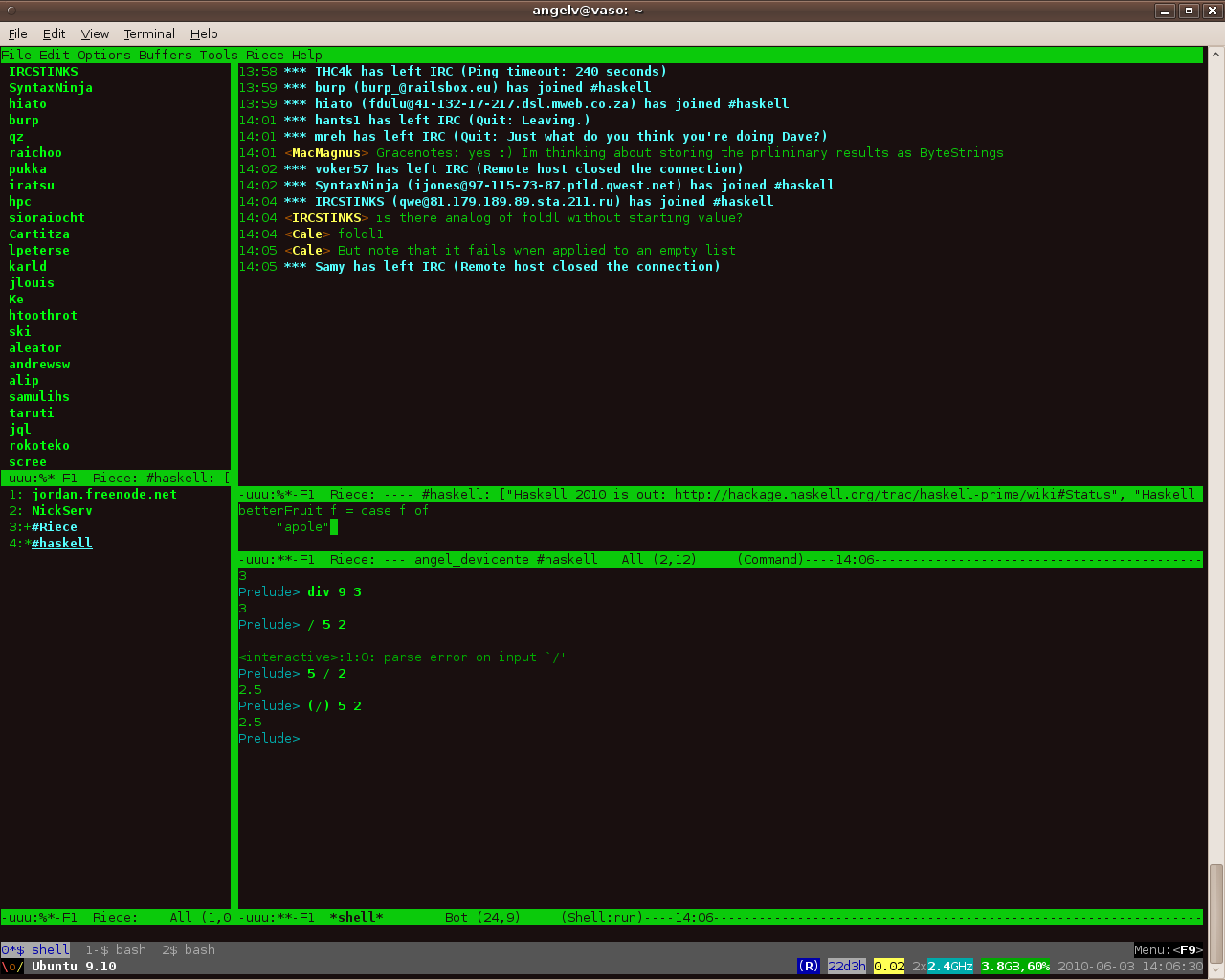
I have never used IRC, but in certain areas it seems like an interesting resource (right now I'm learning Haskell, and the Haskell IRC community #haskell seems quite active), so I've decided to give it a go. After looking at a number of IRC clients I have decided to try Riece, which is an IRC client for Emacs. It certainly fits well with my working environment and I can leave the connection open and reconnect from a different computer via a terminal and ssh. I connect via the freenode servers, and this is how it looks like.

I connect to chat.freenode.net, and the most used commands are in this list.

Thursday, 20 May 2010

Synchronizing newsgroups across different computers


Being a bit old-fashioned, I'm still stuck with newsgroups. I don't read too many of them, but I find them very useful sometimes. The problem is that the protocol seems to be quite old and not amenable for synchronization between different computers. After some time searching for solutions (and thinking about using something like leafnode with the spool option or similar), I'm afraid that the best I came out with is to run a terminal-based news reader at my work computer and connect to it when I'm away from my office. Perhaps not the solution I was looking for, but at least doable and without any trouble. Being an Emacs fan, I did it with Gnus. This is the second time I go back to Gnus... the first one I tried to read all my mail with it, but didn't like it too much... but for news, it looks like it could be quite nice. It was quite easy to set up (despite the documentation style), and this is how it looks when I'm reading one of my subscribed newsgroups (list of free NNTP news servers: here and here).

Wednesday, 29 April 2009

Accessing remote files with Tramp and Emacs

In recent versions of Emacs, tramp is already installed by default, and it is a very easy and convenient way of accessing files in a remote machine. All the documentation is at http://www.gnu.org/software/tramp/