Sunday, 10 October 2010


Saturday, 9 October 2010
From music sheet to MIDI (second round)
Yesterday I tried PDFtoMusic Pro and Audiveris for getting MIDI files out of music sheets. Today I'm trying another software, which looks much more promising: SharpEye.
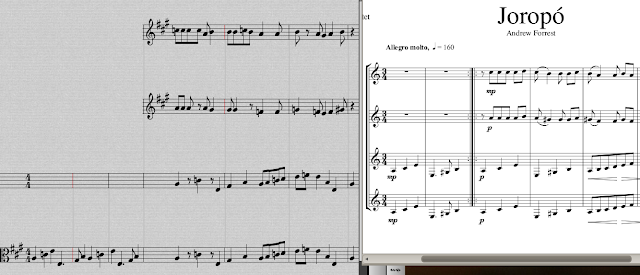
So, let's start with the easy one, the Joropó piece, which comes from a PDF file generated with a music notation software. SharpEye gets this:

Not a single mistake for the first seven bars, for all the guitars. Not bad at all. And the generated MIDI file can be loaded into Rosegarden without any trouble.
How does SharpEye cope with the old scanned document at http://www2.kb.dk/elib/noder/rischel/RiBS0848.pdf? Well, the side-by-side view of the original document and the music recognized shows that there is still plenty of room for improvement, although it does work much better than Audiveris.

But it is true that the quality of the original is a bit poor, so let's be a bit nicer with the poor silicon brain, and let's compare Audiveris and SharpEye with a nicely scanned piece (I scan a random piece in one of my books at 600 dpi, though put it back to 300 dpi when transforming it to JPG (for Audiveris) and TIFF (for SharpEye)), and the first 9 bars of the scanned document look like:

What Audiveris gets is this:

You can see that many of the notes are correct, but this would definitely require some time to tidy it up. Worse is the fact that the MIDI created out of this seems to be broken, and when trying to load it in Rosegarden it simply refuses to do it, showing the message: "Attempt to read past MIDI file end"
SharpEye does a much better job:
 For the first nine bars, it looks like SharpEye has done an excellent job. Actually, for the whole piece (24 bars), I counted only three mistakes, which is very good, but we shouldn't get too carried away... When the created MIDI file is imported into Rosegarden, the first nine bars look like this:

A lot of mistakes now... More or less OK to recognize the piece, but given the quality inside SharpEye, one would like to get a better MIDI file...
The quest for the perfect sheet-to-MIDI tool is still on!
So, let's start with the easy one, the Joropó piece, which comes from a PDF file generated with a music notation software. SharpEye gets this:

Not a single mistake for the first seven bars, for all the guitars. Not bad at all. And the generated MIDI file can be loaded into Rosegarden without any trouble.
How does SharpEye cope with the old scanned document at http://www2.kb.dk/elib/noder/rischel/RiBS0848.pdf? Well, the side-by-side view of the original document and the music recognized shows that there is still plenty of room for improvement, although it does work much better than Audiveris.

But it is true that the quality of the original is a bit poor, so let's be a bit nicer with the poor silicon brain, and let's compare Audiveris and SharpEye with a nicely scanned piece (I scan a random piece in one of my books at 600 dpi, though put it back to 300 dpi when transforming it to JPG (for Audiveris) and TIFF (for SharpEye)), and the first 9 bars of the scanned document look like:

What Audiveris gets is this:

You can see that many of the notes are correct, but this would definitely require some time to tidy it up. Worse is the fact that the MIDI created out of this seems to be broken, and when trying to load it in Rosegarden it simply refuses to do it, showing the message: "Attempt to read past MIDI file end"
SharpEye does a much better job:


A lot of mistakes now... More or less OK to recognize the piece, but given the quality inside SharpEye, one would like to get a better MIDI file...
The quest for the perfect sheet-to-MIDI tool is still on!
Friday, 8 October 2010
Let's get serious about ear-training (seconds)
I seriously need to train my ear, and my ear-training companion is going to be GNU Solfege. The idea is to try (daily or very nearly) one of the many tests that are available with that software and move to the next one when I consistently (three times in a row) can get a higher than 90% accuracy in each one. So, let's start from the beginning, and plot here the performance data for seconds:
From music sheet to MIDI (originally from PDFs to MIDI)
There is a LOT of music out there... thousands and thousands of pieces, and not much time to practice all of them, so it would be very nice to be able to get a PDF file, convert it to MIDI and quickly have an idea of how it is supposed to be, and then perhaps use that MIDI file in order to practice. So I have been trying two different software tools to do it. The first one is PDFtoMusic Pro, which is not available for Linux and is not free, and the other one Audiveris, which is Open Source Software and will happily work in Linux.
In order to test each software, I start with the piece Joropó (for four guitars), which can be downloaded from http://www.forrestguitarensembles.co.uk/quartets.html
PDFtoMusic Pro
I don't have Windows, but I installed this in my Ubuntu 10.04 machine with Wine 1.1.42, and it runs without any (apparent) trouble.

I had no trouble at all to load the file, and to play directly inside it, without exporting it to MIDI, but actually I'm more interested in being able to export it to a MIDI file, so that later I can tweak it from inside Rosegarden or similar.
Exporting the file (or only selected pages) to MIDI is trivial, and when loaded in Rosegarden, there is no problem with playback. If we want to edit the file with the Notation Editor in Rosegarden, the result is pretty good, as can be seen from the first measures:

In order to get the same notation as the original score, we would have to tweak some of the sharps and turn them into flats, connect some notes with ligados, and change the clef of the fourth guitar, but those are quite small things.
If we make changes to the score and then want to print the music, then the result is also quite good from within Rosegarden. In this case, I just changed the clef of the fourth guitar, and printed it from within Rosegarden (which uses Lilypond as the printing engine), and the result was quite acceptable:

So, with PDFs that are generated with a music notation software, PDFtoMusic Pro works very well, but it cannot handle scanned music. For instance, when trying to load the file http://www2.kb.dk/elib/noder/rischel/RiBS0848.pdf it will come up with the message:

Audiveris
Audiveris is different from PDFtoMusic Pro (besides being Open Source), in which it is actually an OMR software and it will scan any document for music, even if it hasn't been generated by a music notation software.
I start Audiveris like:
Audiveris can only handle one page at at time, so we decide to go for the first page, which I save as a PDF (with evince), but the result when loaded is just not there:

So, I convert it to png first, but then Audiveris cannot even load it:
With JPG all looks much better:
And all is fine now:

So far we have only loaded the image. If we now want to perform the OMR step, we just go to the menu Step-Score, and we get the scanned music. If you look carefully below, there are some mistakes, but most of it is in the right place.

Now, in theory one can export this to MusicXML format and use something like Lilypond to create a printable score, but something is not working. If I export it to MusicXML (Score-Export), and then try to use musicxml2ly I get the following errors:
But I don't really care, as I'm interested in getting MIDI stuff (a basic PDF file can be created OK with Audiveris' own Score-PrintPDF option), though this will have the mistakes present in the scan, so it is not that useful...
But now let's go for the real thing: getting a MIDI file and playing it. Midi-Store MIDI will create a MIDI file, which then can be uploaded to a MIDI sequencer, in my case Rosegarden. Without any modification, the MIDI is more or less OK, though obviously the mistakes that were present in the scan are there, so a crucial part will be the ability to edit the score manually.
So, if we open the score editor in Rosegarden, we see that the notes are in there (the third guitar's first three bars don't show up when opening the editor in multitrack mode, but they are there if we open the editor just for the guitar's part), but they are all messed up (different clef for 3rd and 4th guitar, different key, different time signature,...).
How difficult is to change it back to a recognizable score?
Well, I did try to adjust it without looking at the Rosegarden documentation, but it was certainly not that trivial, so I decided to follow one of the Rosegarden tutorials to learn the basics, and then come back to this Joropó score, to try to adjust it properly. I followed the following Rosegarden tutorial, but even after reading that, it looks like doing all the modifications to get a score similar to the original one would be quite costly. A simpler task would be just to modify the MIDI file to "sound" like the original, but it is certainly going to take also some time to do it right.
So, if your music is in a PDF generated by a music notation software and you are happy to pay for it, then certainly PDFtoMusic Pro does a much better job. But how can Audiveris handle scanned music? As with PDFtoMusic Pro, I tried to scan the first page of http://www2.kb.dk/elib/noder/rischel/RiBS0848.pdf but I'm afraid that the result speaks for itself...:

So, I'm afraid that so far Audiveris is work in progress, but cannot really compete with PDFtoMusic Pro. I will continue my quest to see if I can find some way of making MIDI files out of scanned music sheets, but for the moment it looks like either they are PDF files produced with music notation software (in which case I can use PDFtoMusic Pro) or I will have to type them by hand...
In order to test each software, I start with the piece Joropó (for four guitars), which can be downloaded from http://www.forrestguitarensembles.co.uk/quartets.html
PDFtoMusic Pro
I don't have Windows, but I installed this in my Ubuntu 10.04 machine with Wine 1.1.42, and it runs without any (apparent) trouble.

I had no trouble at all to load the file, and to play directly inside it, without exporting it to MIDI, but actually I'm more interested in being able to export it to a MIDI file, so that later I can tweak it from inside Rosegarden or similar.
Exporting the file (or only selected pages) to MIDI is trivial, and when loaded in Rosegarden, there is no problem with playback. If we want to edit the file with the Notation Editor in Rosegarden, the result is pretty good, as can be seen from the first measures:

In order to get the same notation as the original score, we would have to tweak some of the sharps and turn them into flats, connect some notes with ligados, and change the clef of the fourth guitar, but those are quite small things.
If we make changes to the score and then want to print the music, then the result is also quite good from within Rosegarden. In this case, I just changed the clef of the fourth guitar, and printed it from within Rosegarden (which uses Lilypond as the printing engine), and the result was quite acceptable:

So, with PDFs that are generated with a music notation software, PDFtoMusic Pro works very well, but it cannot handle scanned music. For instance, when trying to load the file http://www2.kb.dk/elib/noder/rischel/RiBS0848.pdf it will come up with the message:

Audiveris
Audiveris is different from PDFtoMusic Pro (besides being Open Source), in which it is actually an OMR software and it will scan any document for music, even if it hasn't been generated by a music notation software.
I start Audiveris like:
angelv@vaso:~/audiveris$ java -Xmx256M -jar dist/audiveris-3.4.jar
Audiveris can only handle one page at at time, so we decide to go for the first page, which I save as a PDF (with evince), but the result when loaded is just not there:

So, I convert it to png first, but then Audiveris cannot even load it:
angelv@vaso:~/temp$ convert -density 300 first_page.pdf first_page.png


[...]


omr.sheet.picture.PictureLoader.loadFile(PictureLoader.java:101) -- INFO: Loading image from /home/angelv/temp/first_page.png ...

 omr.sheet.picture.PictureLoader$Listener.imageComplete(PictureLoader.java:366) -- INFO: Image loading complete

 omr.step.SheetSteps$LoadTask.doit(SheetSteps.java:489) -- WARNING: Exception [java.lang.RuntimeException: Unsupported pixel size:16]

 omr.step.Step.doStepRange(Step.java:354) -- WARNING: Processing aborted [omr.step.StepException: java.lang.RuntimeException: Unsupported pixel size:16]
With JPG all looks much better:
convert -density 300 first_page.pdf first_page.jpg
And all is fine now:

So far we have only loaded the image. If we now want to perform the OMR step, we just go to the menu Step-Score, and we get the scanned music. If you look carefully below, there are some mistakes, but most of it is in the right place.

Now, in theory one can export this to MusicXML format and use something like Lilypond to create a printable score, but something is not working. If I export it to MusicXML (Score-Export), and then try to use musicxml2ly I get the following errors:
angelv@vaso:~/temp$ musicxml2ly first_page.xml

Reading MusicXML from first_page.xml ...

Traceback (most recent call last):

  File "/usr/bin/musicxml2ly", line 2969, in

    main()

  File "/usr/bin/musicxml2ly", line 2964, in main

    voices = convert (filename, options)

  File "/usr/bin/musicxml2ly", line 2874, in convert

    (voices, staff_info) = get_all_voices (parts)

  File "/usr/bin/musicxml2ly", line 2583, in get_all_voices

    all_voices = voices_in_part_in_parts (parts)

  File "/usr/bin/musicxml2ly", line 2573, in voices_in_part_in_parts

    voices = voices_in_part (p)

  File "/usr/bin/musicxml2ly", line 2560, in voices_in_part

    part.interpret ()

  File "/usr/share/lilypond/2.12.3/python/musicxml.py", line 676, in interpret

    int (attributes_dict.get ('divisions').get_text ()))

ValueError: invalid literal for int() with base 10: '4.0'

angelv@vaso:~/temp$
But I don't really care, as I'm interested in getting MIDI stuff (a basic PDF file can be created OK with Audiveris' own Score-PrintPDF option), though this will have the mistakes present in the scan, so it is not that useful...
But now let's go for the real thing: getting a MIDI file and playing it. Midi-Store MIDI will create a MIDI file, which then can be uploaded to a MIDI sequencer, in my case Rosegarden. Without any modification, the MIDI is more or less OK, though obviously the mistakes that were present in the scan are there, so a crucial part will be the ability to edit the score manually.
So, if we open the score editor in Rosegarden, we see that the notes are in there (the third guitar's first three bars don't show up when opening the editor in multitrack mode, but they are there if we open the editor just for the guitar's part), but they are all messed up (different clef for 3rd and 4th guitar, different key, different time signature,...).

How difficult is to change it back to a recognizable score?
Well, I did try to adjust it without looking at the Rosegarden documentation, but it was certainly not that trivial, so I decided to follow one of the Rosegarden tutorials to learn the basics, and then come back to this Joropó score, to try to adjust it properly. I followed the following Rosegarden tutorial, but even after reading that, it looks like doing all the modifications to get a score similar to the original one would be quite costly. A simpler task would be just to modify the MIDI file to "sound" like the original, but it is certainly going to take also some time to do it right.
So, if your music is in a PDF generated by a music notation software and you are happy to pay for it, then certainly PDFtoMusic Pro does a much better job. But how can Audiveris handle scanned music? As with PDFtoMusic Pro, I tried to scan the first page of http://www2.kb.dk/elib/noder/rischel/RiBS0848.pdf but I'm afraid that the result speaks for itself...:

So, I'm afraid that so far Audiveris is work in progress, but cannot really compete with PDFtoMusic Pro. I will continue my quest to see if I can find some way of making MIDI files out of scanned music sheets, but for the moment it looks like either they are PDF files produced with music notation software (in which case I can use PDFtoMusic Pro) or I will have to type them by hand...
Monday, 4 October 2010
First Steps with Music Software in Linux
There are not (so far) many musical things that I want to do in the computer, but playing a MIDI file; mixing it with my own recording of playing one of the parts, and exporting it all into an audio file is one of them, so today I set some time to learn the basics. In the computer I did this I'm running Ubutu 10.04, and I have followed the instructions in the Ubuntu Studio pages to quickly install all the software that I need (and much more), and to configure it.
With that in place, I rebooted the PC into the RealTime Kernel, and then I started by running JACK, Qsynth and Rosegarden. (Qsynth needs some soundfonts, and I downloaded some into the file /usr/share/sounds/sf2/FluidR3_GM.sf2. I don't remember where I got them from, but you can get them, for example, at http://musescore.org/handbook/soundfont). This looks like:

Then, it is time to check that all connectivity is working OK. The "Connect" button in the JACK interface will show the connections available. In my case:

This shows that the "General MIDI Device" in Rosegarden is connected to FLUID Synth (QSynth is just the GUI for fluidsynth), so all should be OK.
Then in Rosegarden we load a MIDI file, and select the instruments you want, modify the volume, reverb, etc. It took me a while (perhaps it should have been faster if I had read the documentation) to figure out how to select different instruments for each track, but it is actually quite easy. Just select one of the tracks:

Then say which instrument number you are going to use for that track:

My confusion for a while was to trust the name of what it would appear in the "Instrument" description, before I actually configured each instrument sound. So, the description in the "Instrument" field can be wrong. I guess it keeps whatever it was used last time with whatever synthesizer, so don't trust it, and instead, once you have selected the instrument number, you should specify the sound to be used for that instrument number:

With that in place (you will see that now the Instrument description in the track parameters section above reflects the change made here), you can now use Rosegarden to play the MIDI file with whatever instruments you choose.
So now we just have to record it into an audio file. This is done quite easily by just routing the output of Qsynth to Ardour. First, we will need to create at least one track with Ardour (here in the example: Audio1):

Then, in JACK we will have to connect the output from Qsynth to Ardour:

And lastly is just a matter of recording (first we have to select in which track we will be recording, in this case Audio 1,and then proceed with the "main" recording):

Adding other audio tracks (from an external mic, another software, etc.) would follow similar steps in Ardour. The last step is just to "export session to audiofile".
A basic MIDI-performance obtained in this way can be found at vimeo
With that in place, I rebooted the PC into the RealTime Kernel, and then I started by running JACK, Qsynth and Rosegarden. (Qsynth needs some soundfonts, and I downloaded some into the file /usr/share/sounds/sf2/FluidR3_GM.sf2. I don't remember where I got them from, but you can get them, for example, at http://musescore.org/handbook/soundfont). This looks like:

Then, it is time to check that all connectivity is working OK. The "Connect" button in the JACK interface will show the connections available. In my case:

This shows that the "General MIDI Device" in Rosegarden is connected to FLUID Synth (QSynth is just the GUI for fluidsynth), so all should be OK.
Then in Rosegarden we load a MIDI file, and select the instruments you want, modify the volume, reverb, etc. It took me a while (perhaps it should have been faster if I had read the documentation) to figure out how to select different instruments for each track, but it is actually quite easy. Just select one of the tracks:

Then say which instrument number you are going to use for that track:
My confusion for a while was to trust the name of what it would appear in the "Instrument" description, before I actually configured each instrument sound. So, the description in the "Instrument" field can be wrong. I guess it keeps whatever it was used last time with whatever synthesizer, so don't trust it, and instead, once you have selected the instrument number, you should specify the sound to be used for that instrument number:
With that in place (you will see that now the Instrument description in the track parameters section above reflects the change made here), you can now use Rosegarden to play the MIDI file with whatever instruments you choose.
So now we just have to record it into an audio file. This is done quite easily by just routing the output of Qsynth to Ardour. First, we will need to create at least one track with Ardour (here in the example: Audio1):

Then, in JACK we will have to connect the output from Qsynth to Ardour:

And lastly is just a matter of recording (first we have to select in which track we will be recording, in this case Audio 1,and then proceed with the "main" recording):

Adding other audio tracks (from an external mic, another software, etc.) would follow similar steps in Ardour. The last step is just to "export session to audiofile".
A basic MIDI-performance obtained in this way can be found at vimeo
Thursday, 30 September 2010
Back to student life...
Well, not really! From the student life I will only get the studying part... partying, dating, drinking, etc. are out...
This week we have started all the classes at the Conservatoire. I'm not sure I will be able to follow all of them, but I'm certainly going to try. In total I have 6.5 "contact" hours per week:
Guitar: 1
Ensemble: 1
Harmony: 2
Choral: 1.5
Chamber music: 1
Except for Chamber music, I had already one lesson of each of these.
In the guitar class, we have started directly with the Leo Brouwer simple studies n. VI and VII (they don't look particularly difficult, though they will need some time).
In the ensemble class, we started with two pieces for guitar quartet by Andrew Forrest (Joropó and Barcarowl), which can be downloaded at: http://www.forrestguitarensembles.co.uk/quartets.html
In harmony class, we started with the basic theory on triads, cadences, etc. I was hoping I could follow the Walter Piston book, and skip the lessons, but it looks like the teacher is going to follow a slightly different method, so I guess I will better attend as many lessons as possible.
In choral music class, we started by singing two pieces: "Adoramus Te" by W.A. Mozart and "Hymne a la Nuit" de J.P. Rameau.
Overall I don't think is going to be as difficult as I was expecting, though my intonation skills could certainly be improved, so I will have to devote some time to ear-training stuff. I would gladly do without the choral music class, but I guess at least it will be a way of forcing myself to not forget these ear-training exercises...
Let's see how I can cope with all this extra work in my already quite-busy life...
(Update: 4-Nov-2010)
It was a bit too much, so I decided to drop one of the courses: Chamber Music, which I will to do next year. My current plan is to do the remaining four years to the professional degree in six years (perhaps it is also a bit ambitious, since the higher the year, the higher the number of courses to take), but it is a bit more realistic. Let's see how it goes...
This week we have started all the classes at the Conservatoire. I'm not sure I will be able to follow all of them, but I'm certainly going to try. In total I have 6.5 "contact" hours per week:
Guitar: 1
Ensemble: 1
Harmony: 2
Choral: 1.5
Chamber music: 1
Except for Chamber music, I had already one lesson of each of these.
In the guitar class, we have started directly with the Leo Brouwer simple studies n. VI and VII (they don't look particularly difficult, though they will need some time).
In the ensemble class, we started with two pieces for guitar quartet by Andrew Forrest (Joropó and Barcarowl), which can be downloaded at: http://www.forrestguitarensembles.co.uk/quartets.html
In harmony class, we started with the basic theory on triads, cadences, etc. I was hoping I could follow the Walter Piston book, and skip the lessons, but it looks like the teacher is going to follow a slightly different method, so I guess I will better attend as many lessons as possible.
In choral music class, we started by singing two pieces: "Adoramus Te" by W.A. Mozart and "Hymne a la Nuit" de J.P. Rameau.
Overall I don't think is going to be as difficult as I was expecting, though my intonation skills could certainly be improved, so I will have to devote some time to ear-training stuff. I would gladly do without the choral music class, but I guess at least it will be a way of forcing myself to not forget these ear-training exercises...
Let's see how I can cope with all this extra work in my already quite-busy life...
(Update: 4-Nov-2010)
It was a bit too much, so I decided to drop one of the courses: Chamber Music, which I will to do next year. My current plan is to do the remaining four years to the professional degree in six years (perhaps it is also a bit ambitious, since the higher the year, the higher the number of courses to take), but it is a bit more realistic. Let's see how it goes...
Friday, 24 September 2010
Building A Virtual Cluster with Xen
Not new stuff, but today I was looking for some information on this, and I just realized that I didn't have a link to this article which I posted some years ago at the ClusterMonkey site. I'm not sure how many things would need updating, but the ideas still hold.
The article is in two parts:
Part_1
Part_2
The article is in two parts:
Part_1
Part_2
Subscribe to:
Posts (Atom)